

Your IT Support Experts

We partner with many types of businesses in the area, and strive to eliminate IT issues before they cause expensive downtime, so you can continue to drive your business forward. Our dedicated staff loves seeing our clients succeed. Your success is our success, and as you grow, we grow.

Home

About Us

IT Services

Understanding IT

Low Voltage

News

Blog

Contact Us

Support

Free Consultation

Interested in seeing what we can do for your business? Contact us to see how we can help you! Sign Up Today

Don’t wait any longer. Get started today!

Global Tech Solutions Blog

Tip of the Week: Mastering Page Orientation in Microsoft Word

Tip of the Week: Mastering Page Orientation in Microsoft Word

There are times when using Microsoft Word that will require the addition of an outside element, usually something like an Excel sheet, PowerPoint slide or other visual aid. A common issue faced by users is having to significantly alter the size of the external element to fit between the margins of the portrait orientation, ultimately detracting from its impact.

Here is a quick example of an occasion where changing the orientation for a single page in a document might be of value.
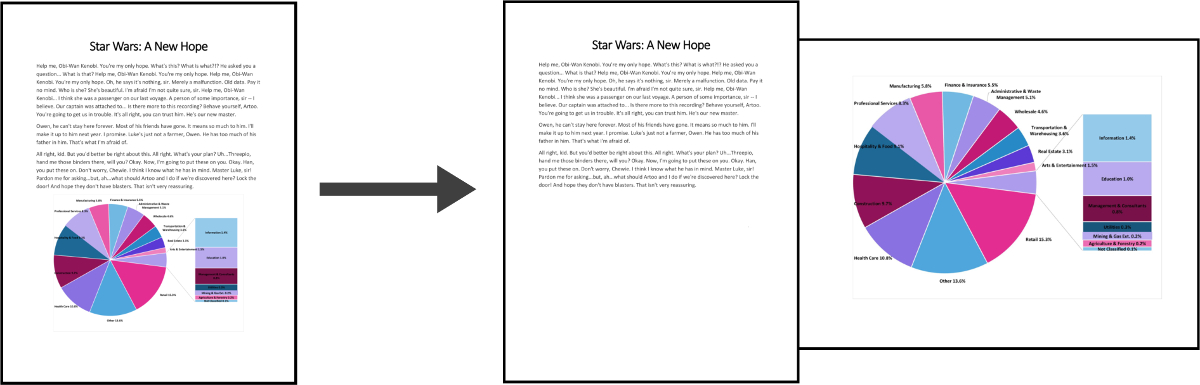
Portrait to Landcape

Begin by navigating to the page inside your Microsoft Word document that you would like to change the orientation of. Once there, make sure that your cursor is on the page.

Open the Layout menu and click the button to expand the Page Setup submenu, as seen below.
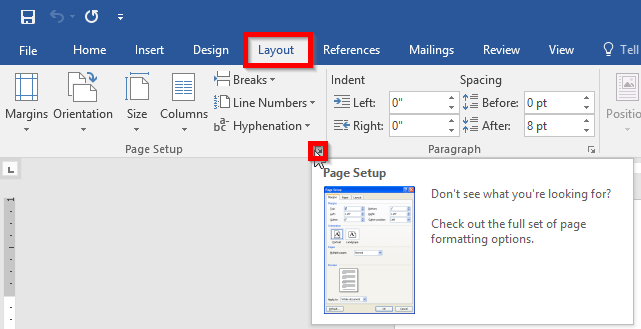
Open Page Setup Menu

Next select the orientation you desire and select what you’d like it applied to using the drop down menu, as demonstrated. In this case, you’ll select ‘This section’. Click OK.
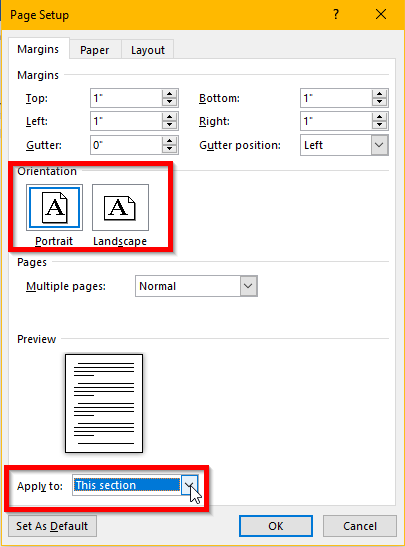
Switching Menu Orientation

Looking for more tips, tricks and hints that will improve the way you and your employees make use of technology? Make sure you check back to Global Tech Solutions’s blog every week for the latest and greatest IT how-tos!

You Can’t Ignore the Elephant in the Server Room
Is Your Cybersecurity Prepared for 2018?
 

Comments

No comments made yet. Be the first to submit a comment
Already Registered? Login Here
Guest
Saturday, February 07, 2026

Captcha Image

Customer Login

Latest Blog

Over time, technology has developed to make processes more efficient and more productive for businesses of any size, offering greater benefits to those that put them to use. Let’s go over three critical needs that businesses have, and three...

Contact Us

National Managed Service Provider

Toll Free: (800) 484-0195
Email:

Download our Playbook