Your IT Support Experts

We partner with many types of businesses in the area, and strive to eliminate IT issues before they cause expensive downtime, so you can continue to drive your business forward. Our dedicated staff loves seeing our clients succeed. Your success is our success, and as you grow, we grow.

Home

About Us

IT Services

Understanding IT

Low Voltage

News

Blog

Contact Us

Support

Free Consultation

Interested in seeing what we can do for your business? Contact us to see how we can help you! Sign Up Today

Don’t wait any longer. Get started today!

Global Tech Solutions Blog

Global Tech Solutions has been in operation since 2007, providing IT Support such as technical helpdesk support, computer support and consulting.

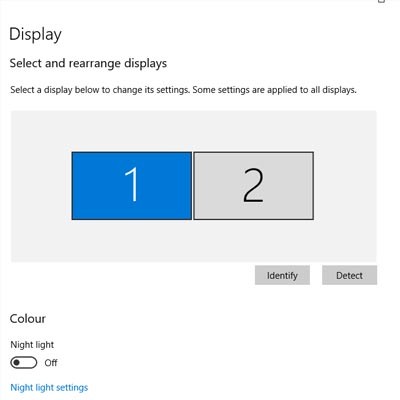
Tip of the Week: Change Display Settings in Windows 10

Tip of the Week: Change Display Settings in Windows 10

One of the easiest ways you can customize your Windows 10 experience is by changing your device’s display settings. There are plenty of settings to change as per your specific needs, so this week’s tip will be dedicated to getting the most out of your displays, whether it’s a large new monitor you got over the holidays or an old one that has a little more life in it.

0 Comments

Continue reading

Tip of the Week: Set Your System up with the Apps You like to Use

Tip of the Week: Set Your System up with the Apps You like to Use

Sometimes you’ll open up a document and it will open up in a default program on your computer that you never use, or one that you might not even know you have. This can happen with common types of file formats, like PDFs or MP3s, that could be opened by more than one program on your computer. Windows 10 makes it easy to customize your user experience through changing up the default applications for specific file types. We’ll show you how it’s done.

0 Comments
Continue reading

Tip of the Week: Bypass the Windows Password Screen By Disabling it Altogether

Tip of the Week: Bypass the Windows Password Screen By Disabling it Altogether

The Windows Login Password Screen serves a valuable purpose in keeping unwanted users from accessing your PC. Although, if your computer is located in a place where unwanted users don’t typically hang out (like your home office), then the Login Screen may feel like a nuisance. In such a scenario, you can go ahead and disable the Windows Password Screen.

0 Comments
Continue reading

Customer Login

Latest Blog

Over time, technology has developed to make processes more efficient and more productive for businesses of any size, offering greater benefits to those that put them to use. Let’s go over three critical needs that businesses have, and three...

Contact Us

National Managed Service Provider

Toll Free: (800) 484-0195
Email:

Download our Playbook