Your IT Support Experts

We partner with many types of businesses in the area, and strive to eliminate IT issues before they cause expensive downtime, so you can continue to drive your business forward. Our dedicated staff loves seeing our clients succeed. Your success is our success, and as you grow, we grow.

Home

About Us

IT Services

Understanding IT

Low Voltage

News

Blog

Contact Us

Support

Free Consultation

Interested in seeing what we can do for your business? Contact us to see how we can help you! Sign Up Today

Don’t wait any longer. Get started today!

Global Tech Solutions Blog

Global Tech Solutions has been in operation since 2007, providing IT Support such as technical helpdesk support, computer support and consulting.

Windows 7 Has Nearly Ticked Its Last Tock

Windows 7 Has Nearly Ticked Its Last Tock

It won’t be long before Microsoft retires two of its most popular operating systems - but hopefully, you already knew that. Microsoft has made a point of reminding Windows 7 users that they need to upgrade before January 14 - and yet, many users haven’t done so.

0 Comments
Continue reading

Taking a Long Look at Microsoft 365

Taking a Long Look at Microsoft 365

Microsoft has always offered a variety of business solutions, some which conform to your needs and others that do not. The beauty of this, is you can pick what solution will benefit your business, and leave the ones that will not behind. Here, we will discuss Microsoft 365 and what is offered within the Microsoft 365 package.   

Recent comment in this post
Talha Rafiq
To promote golobal technolgy, buy instagram followers uk.... Read More
Tuesday, 08 October 2019 09:25
1 Comment
Continue reading

Tip of the Week: Simple Windows 10 Tips

Tip of the Week: Simple Windows 10 Tips

Windows 10 is the benchmark in PC operating systems at this juncture. It offers users all types of great options from previous versions of Windows, while integrating some of today's most dynamic technology to provide users with the very best in organization and ease-of-use. Today we will talk about five very simple tips that will get you started getting the full function of Windows 10.

0 Comments
Continue reading

Tip of the Week: How to Set your Default Video App in Windows 10

Tip of the Week: How to Set your Default Video App in Windows 10

Windows 10 is a great operating system, but it changes up the formula a bit in regard to default applications for certain types of files. Anyone who has been using a computer for any amount of time has their preferred applications for watching videos or listening to music. We’ll show you how to set your default video playback application, as well as how to change certain settings for just about any purpose.

0 Comments
Continue reading

Tip of the Week: How to Speed Up a Slow Windows 10 Device

Tip of the Week: How to Speed Up a Slow Windows 10 Device

Windows 10 is a remarkable tool. Having said this, it can sometimes seem to slow to a crawl… not the ideal situation when you’re trying to be productive. That’s why we’re devoting this week’s tip to speeding up Windows 10.

0 Comments
Continue reading

Tip of the Week: Change Display Settings in Windows 10

Tip of the Week: Change Display Settings in Windows 10

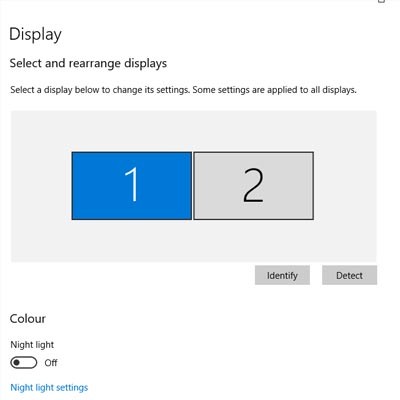
One of the easiest ways you can customize your Windows 10 experience is by changing your device’s display settings. There are plenty of settings to change as per your specific needs, so this week’s tip will be dedicated to getting the most out of your displays, whether it’s a large new monitor you got over the holidays or an old one that has a little more life in it.

0 Comments
Continue reading

Know Your Tech: Breadcrumbs

Know Your Tech: Breadcrumbs

A trail of breadcrumbs can be a useful thing, whether you’re using it like Hansel and Gretel to find their way back home, or you’re using it in computing to find your way back to a page you were previously on. Today’s tech term is dedicated to the latter.

0 Comments
Continue reading

Tip of the Week: Set Your System up with the Apps You like to Use

Tip of the Week: Set Your System up with the Apps You like to Use

Sometimes you’ll open up a document and it will open up in a default program on your computer that you never use, or one that you might not even know you have. This can happen with common types of file formats, like PDFs or MP3s, that could be opened by more than one program on your computer. Windows 10 makes it easy to customize your user experience through changing up the default applications for specific file types. We’ll show you how it’s done.

0 Comments
Continue reading

Windows Ink Adds An Extra Dimension To Your Business Computing

Windows Ink Adds An Extra Dimension To Your Business Computing

Your technology is a gateway to productivity, and Microsoft has managed to put together a great way to use it with their latest operating system. In Windows 10, you can use Windows Ink to doodle or take notes on your screen while using a Microsoft application like Word, PowerPoint, or OneNote.

0 Comments
Continue reading

“The Worst” Windows Bug Discovered... and Thankfully Fixed

“The Worst” Windows Bug Discovered... and Thankfully Fixed

Microsoft has resolved what a security researcher tweeted was “the worst Windows remote code exec” in his memory. This vulnerability allowed a targeted file to implement remote code execution processes, manipulating the infected system and spreading the infection to other machines. In other word, it’s a bad problem to have. The scariest part: the attack would be triggered if a particular file were to be scanned by the Microsoft Malware Protection Engine.

0 Comments
Continue reading

Customer Login

Latest Blog

Over time, technology has developed to make processes more efficient and more productive for businesses of any size, offering greater benefits to those that put them to use. Let’s go over three critical needs that businesses have, and three...

Contact Us

National Managed Service Provider

Toll Free: (800) 484-0195
Email:

Download our Playbook